Why Your Ceiling Fan Is Not Turning On: Troubleshooting and Fixes
Few things are as frustrating as a ceiling fan that refuses to turn on. Whether it’s during the hot summer months or to circulate warm air in winter, a non-functioning ceiling fan can disrupt your comfort at home. If your ceiling fan is not turning on, understanding the possible causes and knowing how to fix them can save you time and money. In this comprehensive guide, we’ll explore common reasons why your ceiling fan might not be working and provide step-by-step troubleshooting tips to get things spinning again.
Common Reasons Why Your Ceiling Fan Is Not Turning On
Before diving into the more technical solutions, it’s helpful to know what typically causes a ceiling fan to fail. Here are some of the most frequent culprits:
- Power supply issues: A tripped circuit breaker, a blown fuse, or a loose wiring connection.
- Faulty wall switch or remote control: Defective or malfunctioning controls can prevent the fan from receiving the signal to start.
- Capacitor problems: The capacitor helps the fan motor start up; when it fails, the fan won’t spin.
- Motor malfunction: Over time, the motor can wear out or get jammed.
- Obstruction or mechanical blockage: Dust, debris, or an object caught in the fan’s blades might prevent movement.
- Incorrect installation: If the fan was installed improperly, it could lead to operational issues.
Step-by-Step Troubleshooting Guide
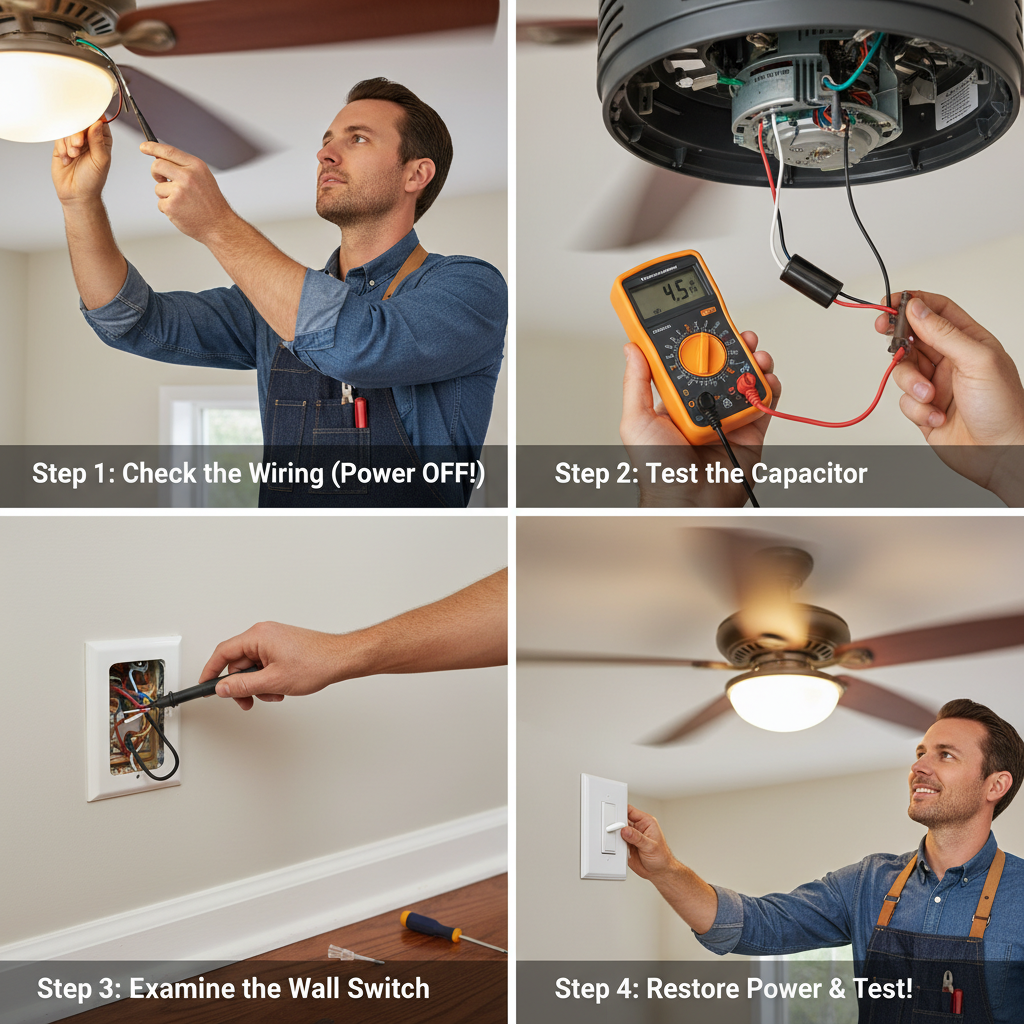
1. Check the Power Source
Start by ensuring that the fan is receiving electricity:
- Verify that the circuit breaker or fuse for the fan’s circuit has not tripped or blown. Reset if necessary.
- Use a voltage tester or multimeter to make sure power is reaching the fan’s wiring box.
- Confirm that the wall switch is turned on and functioning properly. Try toggling it off and on.
2. Inspect the Wall Switch or Remote Control
If the fan is controlled by a wall switch, the switch itself might be faulty:
- Try replacing the switch to see if this resolves the issue.
- If your fan uses a remote control, check the batteries and re-sync the remote to the receiver unit.
- Look for any visible signs of damage or wear on the controls.
3. Examine the Capacitor
The capacitor provides the motor with the necessary initial boost to start turning:
- Listen for humming or buzzing sounds from the fan motor, which might indicate a capacitor issue.
- Visually inspect the capacitor for bulging, leakage, or burn marks.
- Capacitors are relatively inexpensive and easy to replace. If you feel comfortable handling electrical components, you can purchase a replacement part matching your fan’s specifications.
4. Check the Motor and Mechanical Components
Sometimes, the issue lies in the internal motor or physical blockage:
- Turn off the power and manually spin the fan blades to see if they move freely.
- Remove any dust buildup or debris around the motor or blades.
- If the motor is jammed or makes grinding noises, it may require professional attention or replacement.
5. Verify Installation and Wiring
Improper installation can cause the fan not to turn on:
- Double-check all wiring connections following installation instructions.
- Ensure the fan mounting bracket is securely attached and electrical wires are properly connected.
When to Call a Professional Electrician
If all troubleshooting steps fail to bring your ceiling fan back to life, or if you are uncomfortable working with electrical parts, it’s best to consult a licensed electrician. Attempting repairs beyond your skill level can be dangerous and may lead to further damage or injury.
Tips for Maintaining Your Ceiling Fan
Proper maintenance can prevent operational issues:
- Regularly clean fan blades and the motor housing to remove dust and dirt.
- Check for loose screws and tighten them to prevent wobbling or noise.
- Schedule periodic inspections to detect wear and tear early, especially on capacitors and wiring.
FAQs About Ceiling Fans Not Turning On
Why does my ceiling fan hum but not spin?
This usually indicates a faulty capacitor or motor issue. The fan receives power but cannot start rotating without a functioning capacitor.
Can a blown fuse cause a ceiling fan to stop working?
Yes, if the fuse controlling the circuit blows, it cuts off power to the fan, preventing it from turning on.
What should I do if my remote control stopped working?
Replace the batteries, ensure it’s synced correctly, and check the fan’s receiver unit for issues.
Is it safe to replace the capacitor myself?
If you have experience with electrical repairs and follow safety procedures by turning off the power, it can be a straightforward task. Otherwise, hire a professional.
Additional Resources
For more expert guidance on ceiling fan safety and maintenance, visit Good Housekeeping’s guide on ceiling fan cleaning and upkeep.
By following the troubleshooting steps outlined above, most ceiling fan issues can be quickly resolved, restoring comfort and efficiency to your living space.