Why Your Humidifier Might Not Be Adding Moisture: Common Culprits
Before you toss your humidifier out the window, understanding the root cause of its malfunction is the first step toward a solution. Many factors, from simple oversight to routine wear and tear, can prevent your device from effectively humidifying your space.
Is the Water Level Too Low or Tank Empty?
This might seem obvious, but it’s often the simplest oversight. Most humidifiers have an automatic shut-off feature when the water level in the tank drops below a certain point. If the tank is empty or nearly empty, the unit simply won’t have any water to convert into mist or vapor. Always check the water level first, ensuring it’s adequately filled according to the manufacturer’s guidelines. Sometimes, the float sensor that detects the water level can get stuck or calcified, falsely indicating an empty tank even when there’s water.
Mineral Buildup (Scale) and Poor Maintenance
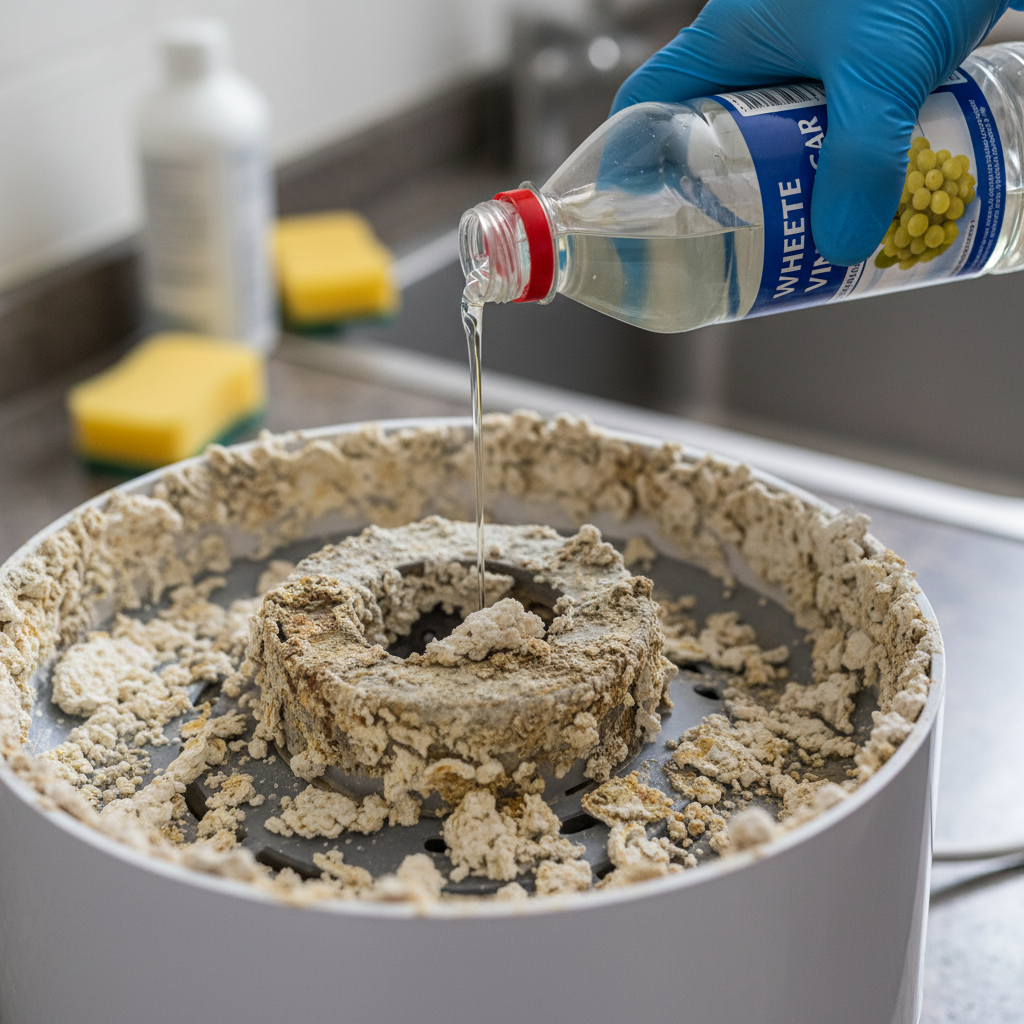
This is arguably the most common reason a humidifier stops working effectively, especially if you use tap water. Tap water contains minerals like calcium and magnesium. Over time, these minerals accumulate and form a hard, crusty deposit known as scale or limescale. In ultrasonic humidifiers, this scale can coat the ultrasonic nebulizer, preventing it from vibrating and producing mist. In evaporative humidifiers, it can clog the wicking filter, inhibiting its ability to absorb water. For warm mist humidifiers, scale can coat the heating element, reducing its efficiency or preventing it from boiling water altogether. Regular cleaning is paramount to prevent this buildup from crippling your device.
Clogged Filters or Wicks
Evaporative humidifiers rely on a wick filter to absorb water from the reservoir and expose it to a fan, which then blows dry air through the moist filter, evaporating the water into the air. Over time, these filters can become saturated with mineral deposits, mold, or mildew, turning rigid and preventing proper water absorption. A clogged filter can’t wick water effectively, meaning less or no moisture will be released into the air. Similarly, in some cool mist humidifiers, a filter might be responsible for trapping impurities and can become clogged, impeding performance.
Malfunctioning Fan or Motor
Many types of humidifiers, including evaporative and some cool mist models, use a fan to propel the mist or humidified air into the room. If the fan motor is faulty, obstructed, or has simply burned out, the humidifier won’t be able to effectively disperse moisture, even if it’s producing it. You might hear a weak hum, a grinding noise, or no sound at all from the fan. Without proper airflow, the moisture either stays within the unit or settles around it.
Defective Humidistat or Sensor
Many modern humidifiers come equipped with a built-in humidistat, which measures the room’s humidity level and automatically turns the unit on or off to maintain a desired setting. If this sensor becomes dirty, covered in dust, or simply malfunctions, it might inaccurately read the room’s humidity. It could mistakenly believe the air is already humid enough, even when it’s bone dry, causing the humidifier to shut off prematurely or not turn on at all. This is particularly common if the sensor is located in a position where airflow is restricted or if it’s placed too close to the mist outlet.
Incorrect Room Size or Humidifier Capacity
Humidifiers are designed for specific room sizes, typically categorized as personal, small, medium, or whole-house. If your humidifier is undersized for the space it’s trying to humidify, it might run constantly without ever reaching your desired humidity level. A small personal humidifier trying to humidify a large living room will seem like it’s not adding moisture, even if it’s working perfectly, simply because its output is insufficient for the volume of air it needs to treat. Always check the manufacturer’s specifications for the recommended room size.
Placing the Humidifier Incorrectly
Where you place your humidifier can significantly impact its perceived effectiveness. Placing it too close to a wall can cause condensation and prevent proper air circulation. Placing it near a window or an open door can allow the newly humidified air to escape, making it seem like the unit isn’t producing enough moisture. Similarly, drafts from vents or fans can disperse the mist too quickly or too widely for it to make a noticeable difference in the immediate vicinity or within the room’s overall humidity. It’s best to place the humidifier on a flat, stable surface, away from walls, furniture, and direct drafts.
Water Quality Issues
While related to mineral buildup, water quality can also impact overall performance beyond just scale. Using tap water often introduces minerals, but sometimes specific impurities or even chemicals can affect the humidifier’s internal components. While most units are designed for tap water, areas with extremely hard water or high mineral content may necessitate using distilled or demineralized water for optimal performance and longevity. Using water with added fragrances or essential oils not explicitly designed for your humidifier type can also lead to blockages and damage.
Ambient Conditions: Extremely Dry Air
Sometimes, the issue isn’t the humidifier itself, but the extremely dry conditions it’s up against. During harsh winter months, when heating systems are running constantly, indoor air can become incredibly dry, sometimes dropping below 20% relative humidity. In such extreme conditions, even a perfectly functioning humidifier might struggle to bring the humidity up to comfortable levels quickly, or it might need to run continuously for a longer period. It might appear to not be adding enough moisture, but it’s simply battling very low starting humidity.
Step-by-Step Troubleshooting: Getting Your Humidifier Back in Action
Now that you understand the potential causes, let’s dive into practical steps you can take to diagnose and resolve the issue with your humidifier.
Initial Checks: Power, Water, and Placement
- Power Supply: Ensure the unit is firmly plugged into a working outlet. Check for tripped circuit breakers.
- Water Level: Confirm the water tank is full and correctly seated. Lift and reseat the tank to ensure good contact.
- Placement: Reposition the humidifier if it’s too close to walls, windows, or vents. Ensure good airflow around the unit.
- Settings: Verify that the desired humidity level on the humidistat is set higher than the current room humidity.
Thorough Cleaning: The Most Common Fix
Regular cleaning is the most effective way to prevent mineral buildup and ensure optimal performance. If your humidifier is not adding moisture, cleaning is often the first and most successful troubleshooting step.
To clean your humidifier:
- Unplug the unit and empty any remaining water from the tank and base.
- Descaling: For mineral deposits, fill the water tank and base with undiluted white vinegar (or a 50/50 mix of vinegar and water for less severe buildup). Let it soak for 20-30 minutes, or up to several hours for heavy scale. Swish the vinegar around to coat all affected surfaces. For hard-to-reach areas, use a soft brush or sponge.
- Rinse Thoroughly: Empty the vinegar and rinse all components several times with clean water until the vinegar smell is gone.
- Sanitizing (Optional, but recommended): To kill bacteria and mold, fill the tank and base with a solution of 1 teaspoon of bleach per gallon of water (or follow manufacturer’s instructions for a specific sanitizing solution). Let it sit for 20 minutes, then rinse thoroughly until the bleach smell is gone.
- Wipe Down: Wipe all surfaces dry before reassembling.
For more detailed cleaning instructions and tips on preventing mold and bacteria, refer to reputable sources like Better Homes & Gardens’ guide on cleaning humidifiers.
Inspect and Replace Filters/Wicks
If you have an evaporative humidifier, inspect the wick filter. If it’s hard, crusty, discolored, or shows signs of mold, it needs to be replaced. Even if it looks relatively clean, if it’s been in use for several months, its efficiency will have significantly decreased. Always follow the manufacturer’s recommended replacement schedule, typically every 1-3 months, depending on water hardness and usage.
Check for Fan Obstructions
With the unit unplugged, carefully inspect the fan blades for any dust, hair, or debris that might be impeding its rotation. Use a soft brush or a vacuum cleaner with a narrow attachment to gently clean the blades. If the fan still doesn’t spin or makes unusual noises after cleaning, the motor might be faulty and could require professional repair or unit replacement.
Test the Humidistat
If your humidifier has an adjustable humidistat, try setting it to a very high humidity level (e.g., 60-70%) to force it to run continuously. If it still doesn’t produce moisture, the issue likely lies elsewhere. If it does start working, the humidistat might be inaccurately reading the room’s humidity, or the room might simply be too dry for the current setting. Ensure the humidistat sensor (if external) is clean and unobstructed.
Consider Water Type
If you consistently experience rapid mineral buildup despite regular cleaning, or if you notice white dust around your humidifier (a common issue with ultrasonic models using hard water), consider switching to distilled or demineralized water. This can significantly reduce mineral deposits and extend the life of your unit.
Evaluate Room Size and Airflow
If you suspect your humidifier is simply too small for your space, consider purchasing a secondary unit for another area or upgrading to a larger capacity humidifier. Also, ensure there’s good air circulation in the room but avoid placing the unit directly in front of powerful air vents or open windows that would quickly dissipate the moisture.
Preventative Maintenance for Optimal Humidification
Once you’ve got your humidifier working again, implementing a consistent maintenance routine will prevent future problems and ensure it efficiently adds moisture to your home.
Regular Cleaning Schedule
Make cleaning a habit. Most manufacturers recommend cleaning the humidifier every 1-3 days if used daily, with a deep clean (descaling and sanitizing) once a week. If you notice any slimy buildup or discoloration, clean it immediately. Consistent cleaning is your best defense against mineral buildup and harmful bacteria/mold growth.
Using the Right Water
While tap water is generally acceptable, using distilled or demineralized water can drastically reduce mineral buildup, especially if you live in an area with hard water. This not only prolongs the life of your humidifier but also prevents the notorious “white dust” often associated with ultrasonic models.
Timely Filter Replacement
For evaporative models, filters are consumables. Mark your calendar for filter replacements according to the manufacturer’s recommendations (usually every 1-3 months). A fresh filter ensures maximum wicking action and efficient humidification.
Proper Storage
If you only use your humidifier seasonally, ensure it’s thoroughly cleaned, dried, and stored in a cool, dry place during the off-season. Leaving stagnant water or moisture inside can lead to significant mold and mildew growth that will be difficult to clean next season.
Monitoring Room Humidity
Invest in a separate hygrometer, a device that measures humidity. This allows you to independently verify your humidifier’s performance and ensure your home’s humidity levels are within the ideal range (typically 30-50%). A separate hygrometer can also help you calibrate your humidifier’s built-in humidistat if it seems inaccurate.
When to Replace Your Humidifier
While many humidifier issues are fixable, there comes a point when replacement is more cost-effective than repair. If your humidifier is old, constantly malfunctioning despite regular maintenance, or requires expensive replacement parts like a new motor, it might be time for an upgrade. Older units can also become less efficient over time. Consider the cost of a new humidifier versus the ongoing frustration and potential repair costs of an ailing one. A brand new, energy-efficient model might offer better performance, advanced features, and greater reliability.
Frequently Asked Questions About Humidifiers
Q: How often should I clean my humidifier?
A: For daily use, it’s recommended to rinse and refill the tank every day. A more thorough cleaning, including descaling and sanitizing the base and tank, should be performed at least once a week. If you notice any slime or mineral buildup, clean it immediately.
Q: Can I use essential oils in my humidifier?
A: Most standard humidifiers are not designed for essential oils. The oils can corrode plastic components, clog internal mechanisms, or leave residues that are difficult to clean and can promote bacterial growth. Only use essential oils in humidifiers specifically designed as diffusers or units with a dedicated essential oil tray. Always check your manufacturer’s instructions.
Q: What’s the ideal humidity level for a home?
A: The ideal indoor humidity level typically ranges between 30% and 50% relative humidity. Maintaining this range helps prevent respiratory issues, dry skin, static electricity, and protects wooden furniture and floors from drying out or warping. Going above 60% can promote mold growth and dust mites.
Q: Why does my humidifier produce white dust?
A: White dust is a common byproduct of ultrasonic humidifiers using hard tap water. It’s caused by airborne minerals (calcium, magnesium) released into the air as the humidifier creates mist. To prevent white dust, use distilled or demineralized water. Some units also offer demineralization cartridges, but these need regular replacement.
Q: How do I know if my humidifier is working effectively?
A: The best way to know if your humidifier is working effectively is to use a separate hygrometer to measure the room’s relative humidity. You should see the humidity level gradually increase towards your desired setting. You can also visually inspect for a consistent mist (for ultrasonic/cool mist) or feel the warm vapor (for warm mist) and notice a general improvement in air comfort.
Conclusion: Breathe Easier with a Well-Maintained Humidifier
When your humidifier is not adding moisture, it can turn a cozy home environment into an uncomfortably dry one. Fortunately, the solutions are often straightforward, ranging from a simple refill to a thorough cleaning or a quick filter replacement. By understanding the common reasons behind humidifier malfunctions and committing to a routine maintenance schedule, you can ensure your device operates efficiently, providing you with comfortable, properly humidified air. Don’t let dry air get the best of you; take these steps, and enjoy the many benefits a well-functioning humidifier brings to your health and home.