Immediate Checks: The Low-Hanging Fruit
Before diving into more complex diagnostics, it’s wise to start with the simplest possibilities. Often, the solution is much easier than you might anticipate.
Is it Just the Backlight?
Some older or simpler thermostats have displays that aren’t truly “blank” but rather have a dead or dim backlight. Try pressing a button or shining a flashlight at the screen to see if any numbers or icons appear faintly. If so, your thermostat might still be functioning, but the backlight needs repair or replacement, which often means replacing the unit itself.

Check the Batteries
This is by far the most common culprit for a blank thermostat screen, especially for battery-powered or hybrid models. Even hardwired thermostats often use batteries as a backup for memory and display. We’ll delve deeper into this, but it’s worth checking first.
Verify Power at the Breaker
Your HVAC system, including your thermostat’s power source, relies on your home’s electrical panel. A tripped circuit breaker can cut power to the entire system, leading to a blank thermostat. A quick check of your breaker box can often resolve the issue.
Understanding Thermostat Power Sources
Before you can effectively troubleshoot, it’s crucial to understand how your thermostat gets its power. Different types of thermostats have different power requirements, and knowing yours will narrow down the potential issues.
Battery-Powered Thermostats
Many older or non-smart programmable thermostats run solely on AA or AAA batteries. These batteries power the display, the internal clock, and sometimes even the communication with your HVAC system. When these batteries die, the screen goes blank, and the thermostat loses all functionality.
Hardwired Thermostats (24V AC)
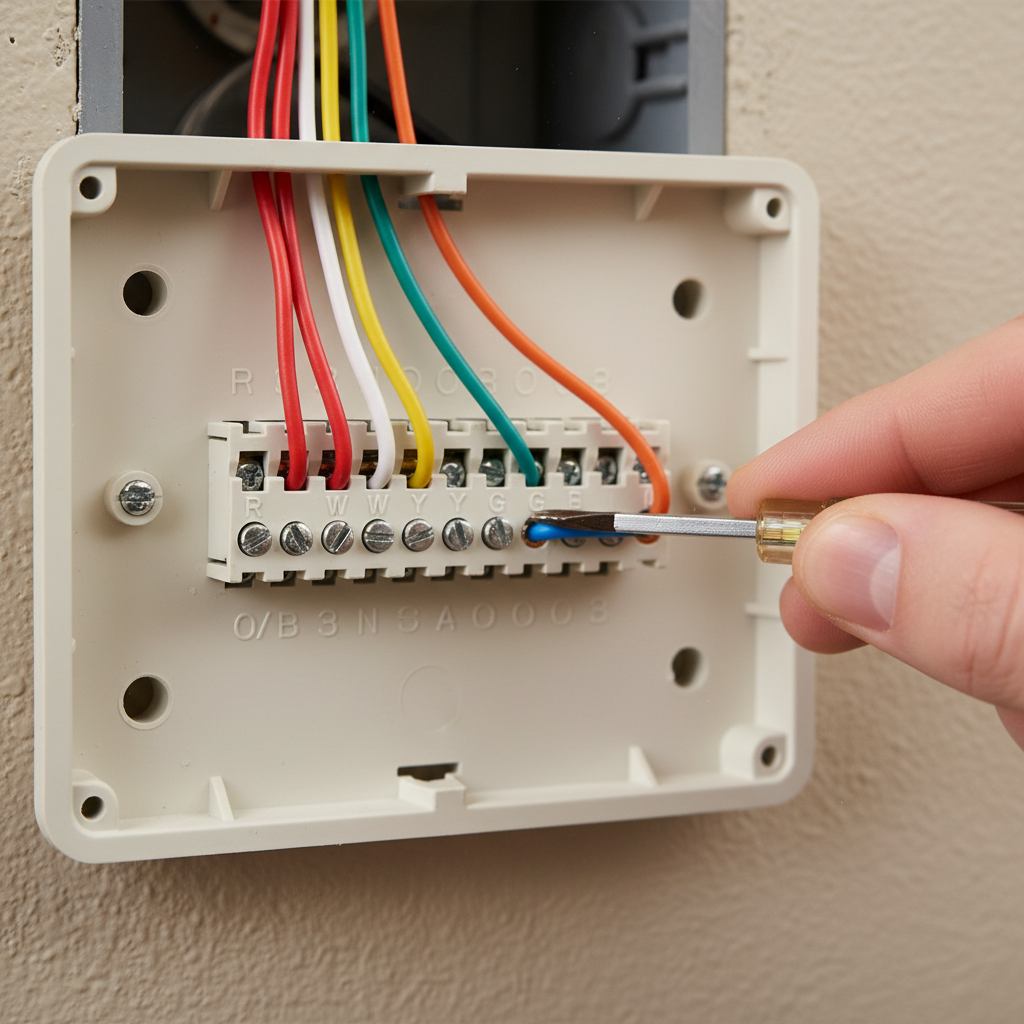
Most modern thermostats, especially those that control complex HVAC systems, are hardwired directly into your heating and cooling unit. They typically draw 24 volts of alternating current (AC) power from a transformer located within your furnace or air handler. This power is usually supplied through a low-voltage wiring system, often identifiable by thin wires connecting to terminals labeled R, C, G, W, Y, etc.
C-Wire (Common Wire) Explained
The “C-wire,” or common wire, is a dedicated wire that provides continuous 24V AC power to your thermostat, completing the circuit from the transformer. Many older hardwired thermostats didn’t require a C-wire because they used internal batteries or “stole” power from other wires (like the “R” wire) to trickle-charge a capacitor. However, modern smart thermostats, with their Wi-Fi connectivity, large screens, and advanced features, demand a constant and reliable power source, making the C-wire essential for their operation. Without a C-wire, or if it’s malfunctioning, a smart thermostat’s screen is very likely to go blank.
Smart Thermostats and Their Power Needs
Smart thermostats are power-hungry devices. They need constant power for Wi-Fi, motion sensors, large color displays, and remote control capabilities. Most smart thermostats explicitly require a C-wire for continuous 24V AC power. If your smart thermostat goes blank, a C-wire issue is often the primary suspect, followed by internal battery drainage (if it has one) or general power loss.
Common Causes of a Blank Thermostat Screen and How to Troubleshoot
Let’s dive into the specifics of why your thermostat might be dark and how you can go about fixing it.
Dead or Weak Batteries
- Symptoms: Screen gradually dims, flickers, shows a low battery icon before going completely blank. Sometimes, only parts of the screen might disappear.
- Solution:
- Carefully remove your thermostat cover. Most covers unclip or pull straight off.
- Locate the battery compartment.
- Replace old batteries with fresh, high-quality alkaline batteries (usually AA or AAA). Ensure they are inserted with the correct polarity (+/-).
- Replace the cover.
Your screen should power on immediately. If not, wait a few minutes, as some thermostats have a slight delay or require a reset after battery replacement.
- When to Replace: It’s good practice to replace thermostat batteries annually, or whenever you change your smoke detector batteries, to prevent unexpected outages.
Tripped Circuit Breaker
- Symptoms: Not just the thermostat, but potentially your entire HVAC system (furnace, air conditioner) is unresponsive. Other electrical devices on the same circuit might also be off.
- Solution:
- Locate your home’s main electrical service panel (breaker box).
- Scan the breakers for any that are in the “OFF” position or, more commonly, an “TRIPPED” position (often halfway between ON and OFF).
- Identify the breaker labeled for your HVAC system (e.g., “Furnace,” “AC,” “HVAC”).
- To reset a tripped breaker, push it firmly to the “OFF” position first, then back to the “ON” position.
- Return to your thermostat. It should power back on.
If the breaker immediately trips again, there might be a short circuit or an overloaded circuit. Do NOT repeatedly try to reset it, as this can be dangerous. Consult a qualified electrician.
Blown HVAC Fuse
Your furnace or air handler often contains a low-voltage fuse (typically a 3-amp or 5-amp car-style fuse) that protects the thermostat’s 24V circuit. If there’s a power surge or a short in the thermostat wiring, this fuse will blow to protect the more expensive components of your HVAC system.
- Symptoms: Similar to a tripped breaker, but often isolated to the HVAC system only. The thermostat is blank, and the furnace/AC won’t turn on.
- Solution:
- SAFETY FIRST: Turn off the power to your furnace/air handler at the main electrical panel (the circuit breaker). Additionally, look for a separate shut-off switch near the furnace itself (often a light-switch style toggle).
- Locate the control board inside your furnace or air handler. The fuse is usually a small, colored blade-type fuse plugged into the circuit board.
- Carefully pull out the fuse. Hold it up to the light; if the wire inside is broken or charred, it’s blown.
- Replace it with a new fuse of the exact same amperage (e.g., 3A, 5A). Never use a fuse with a higher amperage, as this removes the safety protection.
- Close the furnace cover and restore power at the breaker and furnace switch. Your thermostat should now power up.
If the new fuse blows immediately, there’s a short circuit in your wiring or HVAC system. This requires professional diagnosis.
Loose or Disconnected Wiring
Over time, due to vibrations, improper installation, or even minor disturbances, the low-voltage wires connecting to your thermostat or inside your HVAC unit can become loose or disconnected. This interrupts the power supply.
- Symptoms: Intermittent power, or complete loss of power after a recent adjustment or contact with the thermostat/HVAC unit.
- Solution:
- SAFETY FIRST: Turn off power to your HVAC system at the circuit breaker.
- Carefully remove the thermostat from its wall plate. You’ll see the wires connected to terminals (R, C, G, W, Y, O/B, etc.).
- Gently tug on each wire to ensure it’s securely fastened to its terminal. If any are loose, strip a small amount of insulation (if necessary) and reinsert them firmly into the corresponding terminal, tightening the screw (if applicable).
- Check the wiring connections inside your furnace/air handler as well, ensuring all low-voltage wires are secure on the control board.
- Carefully reattach the thermostat to its wall plate and restore power.
If the wires are damaged, frayed, or if you’re unsure about the connections, it’s best to call an HVAC technician.
C-Wire Issues (for Hardwired & Smart Thermostats)
As discussed, the C-wire is crucial for continuous power. Problems with this wire can often lead to a blank screen, especially on smart thermostats.
- Symptoms: Smart thermostat is blank, or constantly cycles on and off, or shows a “no power” error.
- Solution:
- SAFETY FIRST: Turn off power to your HVAC system at the circuit breaker.
- Check the C-wire connection at both the thermostat and the furnace control board. Ensure it’s securely fastened and not damaged.
- Sometimes, older HVAC systems don’t have a C-wire run to the thermostat. In such cases, you may need a C-wire adapter kit or to run a new C-wire. This often requires professional installation.
Issues with C-wire installation or diagnosis can be tricky. If you’re not comfortable with wiring, a professional HVAC technician or electrician is recommended.
Transformer Malfunction
The transformer located in your furnace or air handler converts your home’s 120V AC power down to the 24V AC required by your thermostat and control board. If this transformer fails, your thermostat (and likely your entire HVAC system) will lose power.
- Symptoms: Complete loss of power to the thermostat and HVAC system, even after checking breakers and fuses. No 24V power at the thermostat wiring.
- When to Suspect: If you’ve ruled out all other common issues, and there’s no low-voltage power (24V) at the thermostat’s ‘R’ and ‘C’ terminals (which can be tested with a multimeter, only if you are comfortable and trained to do so), a faulty transformer is a strong possibility.
- Professional Diagnosis: Replacing a transformer involves working with high voltage, and it’s best left to a qualified HVAC technician.
Thermostat Overload or Software Glitch
Just like any electronic device, thermostats can sometimes experience temporary software glitches or get overloaded, leading to a frozen or blank screen.
- Symptoms: Screen goes blank seemingly at random, or after a specific action. Sometimes, a reset can fix it.
- Solution: Perform a soft reset. This usually involves removing the thermostat from its wall plate (disconnecting it from power) for a few minutes, then reattaching it. For some smart thermostats, there might be a specific reset button or a sequence of button presses to restart the device. Consult your thermostat’s user manual for specific reset instructions.
Damaged Thermostat Unit
Physical damage, water exposure, or simply age can cause a thermostat to fail. Internal components can short out, display screens can cease to function, or the unit might just wear out.
- Symptoms: Visible cracks or damage, exposure to moisture, or the thermostat is very old and has simply stopped working despite all other troubleshooting.
- Replacement Considerations: If your thermostat is old, consistently unreliable, or visibly damaged, replacing the unit might be the most straightforward solution. Consider upgrading to a modern, energy-efficient smart thermostat if you’re replacing an old model.
Recent Power Outage or Surge
A recent power outage, especially if followed by a surge, can sometimes disrupt electronics. While circuit breakers and fuses are designed to protect against surges, sometimes a strong surge can still cause damage or simply confuse a thermostat’s internal systems.
- Symptoms: Thermostat went blank immediately after power was restored following an outage.
- Solution:
- Check the circuit breaker and HVAC fuse, as these are the primary protectors.
- Perform a soft reset of the thermostat (remove from wall plate for 5 minutes, then reattach).
- If it still doesn’t power on, check for other related issues like a blown transformer.
For more general tips on protecting your home’s electronics, Better Homes & Gardens offers advice on surge protection and managing power fluctuations.
When to Call a Professional
While many thermostat issues can be resolved with DIY troubleshooting, some situations warrant professional help. Don’t hesitate to call an HVAC technician or a licensed electrician if:
- Safety Concerns: You are uncomfortable working with electrical wiring, dealing with circuit breakers, or accessing internal furnace components.
- Persistent Issues: You’ve tried all the troubleshooting steps, and the screen remains blank.
- Complex Wiring: Your HVAC system has complex wiring, multiple zones, or an unfamiliar setup.
- New Installation Problems: Your thermostat went blank shortly after a new installation or a recent repair.
- Repeated Breaker/Fuse Trips: The circuit breaker trips or the HVAC fuse blows immediately after being reset or replaced. This indicates a serious underlying electrical problem.
Preventing Future Blank Screens
A little proactive maintenance can go a long way in ensuring your thermostat remains operational and your home comfortable.
- Regular Battery Checks: For battery-powered or hybrid thermostats, make it a habit to check and replace batteries annually, or when your thermostat indicates a low battery warning.
- Annual HVAC Maintenance: Schedule professional HVAC maintenance once a year. Technicians can spot potential wiring issues, check the transformer, and ensure your entire system is running efficiently, which indirectly protects your thermostat.
- Proper Installation: If installing a new thermostat, either ensure you follow the instructions meticulously or hire a professional to guarantee correct wiring and setup.
- Consider a C-Wire Adapter or Upgrade: If you have an older system without a C-wire and are using a smart thermostat, consider installing a C-wire adapter or having a new C-wire run. This provides stable power and reduces reliance on internal batteries or power-stealing methods.
Frequently Asked Questions (FAQs)
Q: Can a blank thermostat screen still control my HVAC?
A: In rare cases, if only the backlight is out but the thermostat’s internal logic board still has power, it might technically still be sending signals. However, for most thermostats with a blank screen, it indicates a complete loss of power or a critical internal failure, meaning it cannot control your HVAC system.
Q: How do I know if my thermostat needs a C-wire?
A: Most smart thermostats explicitly state in their requirements if a C-wire is necessary. You can also check your existing thermostat’s wiring. If there’s a wire connected to the “C” terminal on the wall plate, you have a C-wire. If not, and your smart thermostat requires one, you’ll need to install one or use an adapter.
Q: Is it safe to replace thermostat batteries myself?
A: Yes, absolutely. Replacing thermostat batteries is a simple, safe task that most homeowners can perform. Just ensure you use the correct battery type and dispose of old batteries responsibly.
Q: What’s the difference between a blown fuse and a tripped breaker?
A: Both are safety devices that interrupt electrical flow to prevent damage. A circuit breaker is a reusable switch that “trips” (flips off) when there’s an overload or short circuit. It can be reset manually. A fuse, on the other hand, contains a small wire that melts and breaks the circuit when too much current flows through it. A blown fuse must be replaced with a new one.
Q: How much does it cost to replace a thermostat?
A: The cost varies widely depending on the type of thermostat. Basic programmable thermostats can cost anywhere from $25-$100, while advanced smart thermostats can range from $150-$300 or more. Installation costs, if you hire a professional, typically add another $100-$250, depending on the complexity of the wiring and labor rates in your area.
Conclusion
A blank thermostat screen can certainly be alarming, but as this guide illustrates, the problem is often solvable with a bit of systematic troubleshooting. From checking simple batteries to resetting a circuit breaker, many common issues can be fixed without professional intervention. However, always prioritize safety, especially when dealing with electrical components. If you’ve gone through the steps and your thermostat remains unresponsive, or if you’re ever in doubt, don’t hesitate to contact a qualified HVAC technician or electrician. A working thermostat is key to a comfortable home, and understanding its power sources and common malfunctions empowers you to keep your climate control system running smoothly.